










How can I receive text messages and calls while connected with my eSIM?
While using your Hoam eSIM, you can still use another line for voice and text messages (SMS).
In order to use your primary line for voice and text while you enjoy your HOAM eSIM for data, you need to enable the primary line and set it up as your Default Voice line. Data Roaming may also need to be enabled, depending on the requirements of your local mobile carrier. This may result in roaming charges, so we highly encourage you to consult your local mobile carrier to learn about the charges before proceeding.
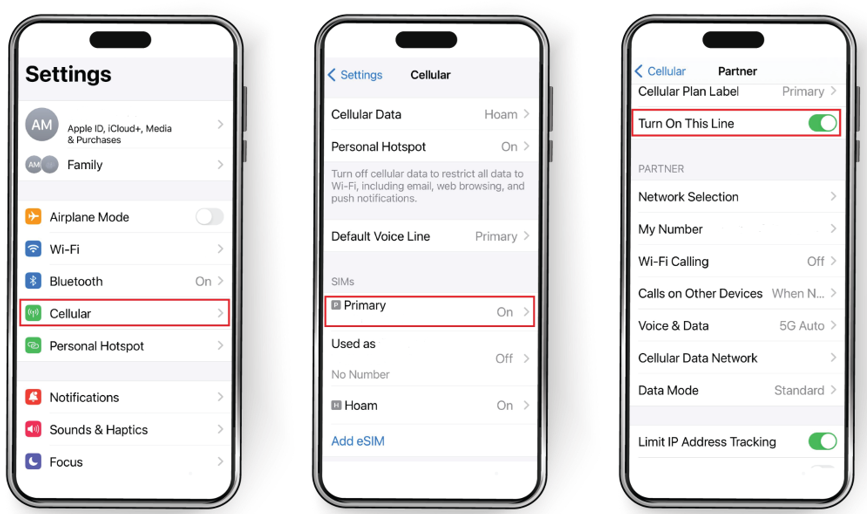
- Open Settings
- Tap Cellular
- Tap your Primary line
- Toggle ON “Turn On This Line”
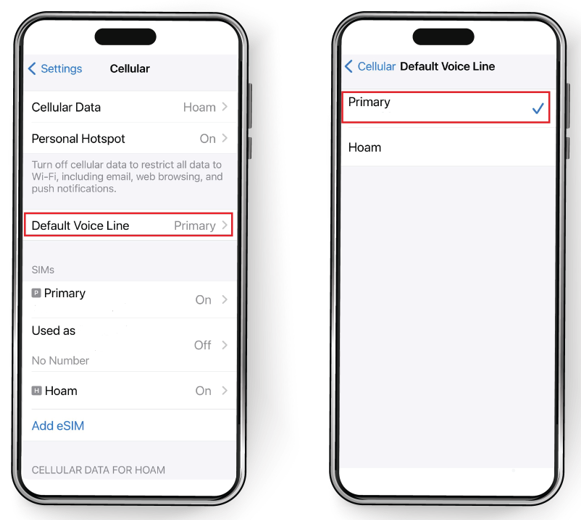
- Go back to Cellular. Then tap “Default Voice Line”
and Select your Primary Line
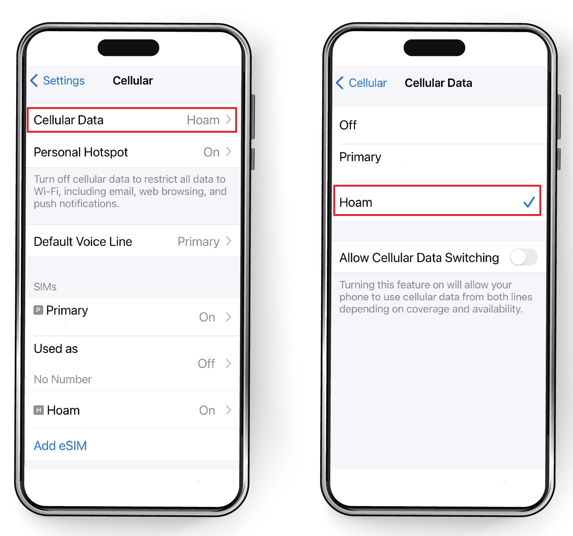
- Go back to Cellular page. This time select Cellular Data
and Make sure that you keep your eSIM selected for cellular data